Showing posts with label Script. Show all posts

Create contact us form for your blog

  How about getting feedback from your visitors directly to your email address ? ,Yah thats so simple now.You can create it within three minutes.Even you didn't know the basic html, you can easily create the form.You can add name textarea,message textbox,email textbox and you can make this as required box.When your visitors submit the form , you would get the entered data to your email address.You would get the IP address of your visitors .

Go to www.emailmeform.com ,it will help you to create contact forms. You can add more css code and scripts there.
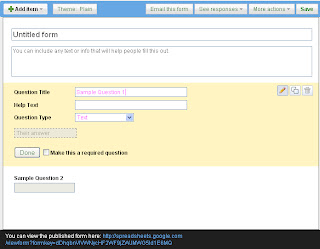
   You can also use Google Docs to create such contact Forms.

  •  Go to Google docs  


    • Click on "Create New" button on left side [ Pic]


          • Select Form


                • Now type Question , and select required or not. You can add more item by click on "Add item" at the top of the form.


                      • You can view the form by copying the link at the bottom of the form.[Just like in the image] .


                            • You can also make into iframeby hit on "More actions" and select "embed" and copy the iframe code,and paste the code in your post. Click here to know more about iframe.

                          Iframe to add another blog into your blogger page

                          Do you ever dream to display another blog in your blog ,as one blog. This technic is called Website merging.Iframe helps to do it.You can put an IFrame in
                          either a blog post, or in a special page element. It's a dynamic window; when
                          you change something in the blog contained in the window, the contents of the
                          window changes too. Just refresh, and you can see the change.


                          • This is the syntax to do it.Please see this Post , where i merged Google groups into a post.


                                     For this i used this Code.


                          • You can adjust this code according to your post area width and size.


                          • To merge another blog,you should get the URL of desired website and replace in the http://groups.google.com/group/blogknol in the code that i give above.

                          Create a Scroll Bar Using CSS in Blog

                          To create a Scroll bar in your Blog,You should follow the steps,


                          •  Go To Layout and Click on Add Gadget


                          Falling Snow effect to blog


                          Now make more attraction your blog, by giving falling snows on your blog.

                          While you browse on you blog, you can feell the falling of snow, leaves, xmas decorations and all.

                          Its very nice to look.

                          Yes, Create it now very easily with me.


                          Step 1: 

                                   Save and upload to your site one of the following two images (depending on the effect you want), by right clicking the image, and choosing "save as":

                          snow.gif (256 bytes) (225 bytes)

                          Step 2: 

                                   Having done that, simply add the below chunk of code to the  section of your page:

                          Select All


                          Be sure variable "snowsrc" in the above code correctly references the full URL path to the image used. Enjoy!


                          Thanks to : http://dynamicdrive.com


                          Subscript and superscript in blog post

                          Today my friend tito dutta asked me about superscript and sub script in Blog posts.

                          It is very sad to say that there is no icons in blogger new updates Editor.

                          But by using some html Codes, it can be possible in Your blog.

                          Few of us may not know what it is, For those ,

                          What is super scipt ?

                          Example : 

                           18 th  - this is an example for supper scipt .

                          What is Subscript ?

                          Example :

                          18 th This is another example for Subscript


                          To Add this on your Post.

                          •  Make your editor in "html Code" 


                          (* Sorry for this Low Quality picture ")


                          • Change the "TEXT" and paste your text which you wanna be a super script or be a sub script

                          Enjoy .


                          Horizontal drop down menu

                          Many bloggers needed their blog more graphically professional.To this idea,i added here another css script to create horizontal menu bar with drop down facility.Now create drop down menu bar within ten seconds!!. Last week i posted a horizontal menu bar code.
                          You need just

                          • Copy this code paste it to "HTML/SCRIPT" gadgets.
                          • Then hit on save.
                          • Done!!!


                          <style type="text/css">

                          /*Credits: Blogxool.blogspot.com */
                          /*URL: http://www.blogxool.blogspot.com */
                          .menu{
                          border:none;
                          border:0px;
                          margin:0px;
                          padding:0px;
                          font-family:verdana,geneva,arial,helvetica,sans-serif;
                          font-size:14px;
                          font-weight:bold;
                          color:8e8e8e;
                          }
                          .menu ul{
                          background:url(http://www.cssmenumaker.com/menus/062/images/menu-bg.gif) top left repeat-x;
                          height:43px;
                          list-style:none;
                          margin:0;
                          padding:0;
                          }
                          .menu li{
                          float:left;
                          padding:0px 8px 0px 8px;
                          }
                          .menu li a{
                          color:#666666;
                          display:block;
                          font-weight:bold;
                          line-height:43px;
                          padding:0px 25px;
                          text-align:center;
                          text-decoration:none;
                          }
                          .menu li a:hover{
                          color:#000000;
                          text-decoration:none;
                          }
                          .menu li ul{
                          background:#e0e0e0;
                          border-left:2px solid #f68618;
                          border-right:2px solid #f68618;
                          border-bottom:2px solid #f68618;
                          display:none;
                          height:auto;
                          filter:alpha(opacity=95);
                          opacity:0.95;
                          position:absolute;
                          width:225px;
                          z-index:200;
                          /*top:1em;
                          /*left:0;*/
                          }
                          .menu li:hover ul{
                          display:block;
                          }
                          .menu li li {
                          display:block;
                          float:none;
                          padding:0px;
                          width:225px;
                          }
                          .menu li ul a{
                          display:block;
                          font-size:12px;
                          font-style:normal;
                          padding:0px 10px 0px 15px;
                          text-align:left;
                          }
                          .menu li ul a:hover{
                          background:#949494;
                          color:#000000;
                          opacity:1.0;
                          filter:alpha(opacity=100);
                          }
                          .menu p{
                          clear:left;
                          }
                          .menu #current{
                          background:url(http://www.cssmenumaker.com/menus/062/images/current-bg.gif) top left repeat-x;
                          color:#ffffff;
                          }

                          </style>
                          <div class="menu">
                          <ul>
                          <li><a href="#" >Home</a></li>
                          <li><a href="#" id="current">Products</a>
                          <ul>
                          <li><a href="#">Drop Down CSS Menus</a></li>
                          <li><a href="#">Horizontal CSS Menus</a></li>
                          <li><a href="#">Vertical CSS Menus</a></li>
                          <li><a href="#">Dreamweaver Menus</a></li>
                          </ul>
                          </li>
                          <li><a href="/faq.php">FAQ</a>
                          <ul>
                          <li><a href="#">Drop Down CSS Menus</a></li>
                          <li><a href="#">Horizontal CSS Menus</a></li>
                          <li><a href="#">Vertical CSS Menus</a></li>
                          <li><a href="#">Dreamweaver Menus</a></li>
                          </ul>
                          </li>
                          <li><a href="/contact/contact.php">Contact</a></li>
                          </ul>
                          </div>


                          This sample contain only one model,If you want more models with more variety ,
                          Click here.
                          This webseite contain all types of  Menu bar that match with your Blog.


                          Thanks
                          Enjoy!

                          Add background music for Blog


                           The easiest method of adding background sound is to include a line like this in your blog template, just after the opening <body> tag:
                          <bgsound src="http://yoursite.com/yoursound.mp3" loop=infinite>
                          where the URL is that of the background music you wish to use. This method works perfectly well, but visitors to your site will not be able to switch the music off if it becomes distracting.

                          So instead, you may prefer to use this method instead, which is compatible with all browsers (press the play icon to start music):This is achieved by including the following code somewhere in your template (eg: the sidebar):
                          <embed width="200" src="http://yoursite.com/yourmusic.mp3" autostart="false" loop="false" height="50"></embed>
                          You can change some of the variables to suit your needs:
                          • autostart: set to "true" to make the music begin as soon as the page is loaded, or "false" to ensure the user has to press the play icon
                          • loop: set to "true" to have the music play over and over, or "false" so that it plays only once.
                          • height: if this is set to "40", only the play options will be visible. You can make this larger if you prefer, in which case blank space will be visible.
                          Using either method, you can link to .mp3, .mid or .wav music files. However, you must be aware of copyright restrictions, and ensure you have the appropriate permission for use for the music you decide to use!

                          Here are some sites I've used for copyright-free music you could use in your blog:

                          Create Horizontal menubar


                          Look to my horizontal menu bar.Most of the blogger will be like it to add them at their Blog.For this reason i am publishing the code here.
                          You need just copy the code and paste it "html/script" Gadget on Page elements.


                          <style type="text/css"> 
                          /*Credits: Blogxool.blogspot.com */ 
                          /*URL: http://www.blogxool.blogspot.com */ 
                          .underlinemenu{ font-weight: bold; width: 100%; 
                          }  
                          .underlinemenu ul{ padding: 6px 0 7px 0;
                          /*6px should equal top padding of "ul li a" below, 7px should equal bottom padding + bottom border of "ul li a" below*/ margin: 0; text-align: right; //set value to "left", "center", or "right"*/ } .underlinemenu ul li{ display: inline; } .underlinemenu ul li a{ color: #494949; padding: 6px 3px 4px 3px; /*top padding is 6px, bottom padding is 4px*/ margin-right: 20px; /*spacing between each menu link*/ text-decoration: none; border-bottom: 3px solid gray; /*bottom border is 3px*/ } .underlinemenu ul li a:hover, .underlinemenu ul li a.selected{ border-bottom-color: black; } </style> <div class="underlinemenu"> <ul> <li><a href="http://www.blogxool.blogspot.com/">Home</a></li> <li><a href="http://blogxool.blogspot.com/2009/09/free-blog-templates.html">Free Blog templates</a></li> <li><a href="http://www.blogxool.blogspot.com/">Bx-code errors</a></li> <li><a href="http://blogxool.blogspot.com/2009/10/tricks.html">Tricks and Hack</a></li> <li><a href="http://blogxool.blogspot.com/2009/10/scripts.html">Script n Code</a></li> <li><a href="http://www.blogxool.blogspot.com/">About Us</a></li> </ul> </div>

                          Done!!
                          Thanks
                          Please show comments :)

                          Create Horizontal menubar


                          Look to my horizontal menu bar.Most of the blogger will be like it to add them at their Blog.For this reason i am publishing the code here.
                          You need just copy the code and paste it "html/script" Gadget on Page elements.


                          <style type="text/css"> 
                          /*Credits: Blogxool.blogspot.com */ 
                          /*URL: http://www.blogxool.blogspot.com */ 
                          .underlinemenu{ font-weight: bold; width: 100%; 
                          }  
                          .underlinemenu ul{ padding: 6px 0 7px 0;
                          /*6px should equal top padding of "ul li a" below, 7px should equal bottom padding + bottom border of "ul li a" below*/ margin: 0; text-align: right; //set value to "left", "center", or "right"*/ } .underlinemenu ul li{ display: inline; } .underlinemenu ul li a{ color: #494949; padding: 6px 3px 4px 3px; /*top padding is 6px, bottom padding is 4px*/ margin-right: 20px; /*spacing between each menu link*/ text-decoration: none; border-bottom: 3px solid gray; /*bottom border is 3px*/ } .underlinemenu ul li a:hover, .underlinemenu ul li a.selected{ border-bottom-color: black; } </style> <div class="underlinemenu"> <ul> <li><a href="http://www.blogxool.blogspot.com/">Home</a></li> <li><a href="http://blogxool.blogspot.com/2009/09/free-blog-templates.html">Free Blog templates</a></li> <li><a href="http://www.blogxool.blogspot.com/">Bx-code errors</a></li> <li><a href="http://blogxool.blogspot.com/2009/10/tricks.html">Tricks and Hack</a></li> <li><a href="http://blogxool.blogspot.com/2009/10/scripts.html">Script n Code</a></li> <li><a href="http://www.blogxool.blogspot.com/">About Us</a></li> </ul> </div>

                          Done!!
                          Thanks
                          Please show comments :)

                          AlertBox-in-Blog

                          Add a Alert box in Your Blog with a confirmation button.


                                If you wanna to announce a new feature in your blog.What will you do for ?Most of us Make the feature at the top of our blog.But,don't you ever think of a alertbox that alert them about our new feature ?If you don't ,Now the time arrives , 
                          You can have a serious message for sites with adult contents or light message for fun :-

                          Alert Message and Dialog Box


                          This post will show you to how to add alert box to your Blog.
                          Now follow me :
                          Steps : 

                          • Go To Template 
                          • Page Elements
                          • Add a Page Element in your left sidebar or post body area, and select HTML/JavaScript.

                           Paste the code shown below:-
                              <script type="text/javascript">
                          alert('I FOUND NEW HACKING SOFTWARE')
                          </script>
                          <noscript>Enable javascript in your browser to view an important message.</noscript>

                          To insert the alert dialog box, login to your account, go to Template -> Page Elements -> Add a Page Element in your left sidebar or post body area, and select HTML/JavaScript. Paste the code shown below:-

                          <script type="text/javascript">
                          confirm('This site contains explicit contents. Are you sure you want to continue?');
                          if (confirm('This site contains explicit contents. Are you sure you want to continue?')) {
                          window.location = "http://Blogxool.blogspot.Com/";
                          }
                          else {
                          window.location = "http://www.google.com/";
                          }
                          </script>


                          Your message appears in the red portion. Enter your Blog URL in the bluecolored part of the code. This is where your visitors will go to if they click “OK”. In the orange part, enter the URL of the place to redirect your visitors to should they click “Cancel”.

                          Alert Box with Prompt field

                          Another type of dialog box prompts the user to enter some information. For instance, the prompt box can ask the reader for his name and use that to customize the web page. Be reminded that many browsers are configured to disable scripts that ask for information. Have fun customizing your Blog but don't make this a key aspect of the contents. For example, if you have a story that keeps mentioning the name of the reader, the parts where the name should be will appear “null”.

                          In Template -> Page Elements -> Add a Page Element we add a HTML/JavaScript and paste the following code:-

                          <script type="text/javascript">
                          var yourName = prompt("How can we address you?", "Reader");
                          </script>


                          The question can be changed. The user will be prompted to enter something in the dialog box. He can of course leave it blank and press “OK” or click “Cancel”.

                          Alert Message and Dialog Box

                          Below this JavaScript, in your main body, add another HTML/JavaScript page element. This time, you can type in this:-

                          Welcome back <script type="text/javascript">document.write(yourName)</script>! Feel free to look around. If you like what you read, mention us in your post or link to this site. Hope to see you again <script type="text/javascript">document.write(yourName)</script>


                          This is what will appear in your Blog, based on the input that the reader keys in.

                          Alert Message and Dialog Box

                          Change the wordings to suit you and wherever you want the reader's name mentioned, add the script (shown in red). Try to phrase the wordings such that if the user enters nothing and clicks “OK”, the blank space is not obvious. A prompt dialog box like this adds a personal touch to your Blog.

                          Scripts


                          • Script for Add Alert Box to your Blog
                          • Add simple Slide show 
                          • Add top bar buttons
                          • Add side bar dynamic buttons