Showing posts with label hacks. Show all posts

How to hide your blog


Don't misunderstand the head,i just says to hide your blog from dashboard.Yes within one step you can hide your blog from dashboard,and thus you can just play with friends who share his blog to you.That is just simple,and don't worry you can recover this hided blog.


  • Go to Dashboard where your blog name displays.


  • Click on "Hide" along with blog name.


    • Finished.

    Recover accidentally deleted post

    Blogger offer an 'Undelete option' to delete a blog,what will do if your post has been deleted ? If you accidentally deleted a post, how can you try to recover (undelete) the deleted post? I have three different ideas, one of them depends on the cooperation of a helper plus a good memory or clever guesswork.


    METHOD 1


           This method is applicable if you are still working on the same computer where you had prepared the post (or had viewed the deleted post). Just press ctrl+H (Cmd+H on MAC OS) to open a sidebar listing the browser history. Go to the part where you were editing the post and continue to edit or publish the post (or copy-paste from the cached copy of the displayed post):
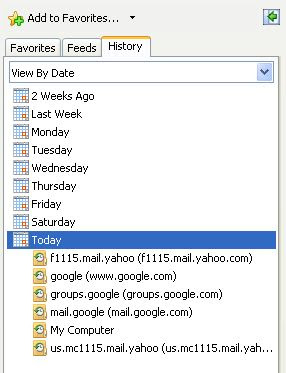


    browser history in sidebar


    Alternative keyboard shortcut to call up the browser is shift+ctrl+H (shift+Cmd+H for MAC OS).


    METHOD 2


    This method is applicable if you had not closed the tab or window where you had been preparing the deleted post (or had viewed the deleted post). Just keep pressing the BACK button till you get back to the point where you were editing the post (or had viewed the post).


    METHOD 3


    Try to find a cached copy of the deleted post on the Web and restore the post from the cached copy. Type in


    cache:URL


    to try to find cached copies on the net.


    METHOD 4


            This is applicable even if you have no access to the computer where you had edited or viewed the deleted post, but you must have the URL (permalink) of the deleted post. If you don't have the URL, then you can try to guess the URL from the post title.


    For example, the title of this post is "Recover accidentally deleted post". Now I haven't published the post yet, but I can guess that this post URL will be:


    http://www.blogxool.blogspot.com/recover-accidentally-deleted-post


    If you have or can guess the deleted post URL and you want to try to undelete the deleted post, leave the URL in a comment and I will try to help.


    Hope you enjoyed my post.

    Thanks

    Please comment on this :)

    Add a fevicon for your Blog

    Now remove blogger fevicon and add your style fevion for your Blog.
    It makes a real nice touch for your Blog.
    Example for Fevicon. Now you too can Create  a Fevicon for your blog,by removing the current blogger fevicon.


    Favicon in IE address bar

    How to add ?

          Simply upload the file, favicon.ico to the blog or other free uploading websites and get the Link. Make sure your favicon file is named “favicon.ico.” When someone bookmarks your site with a browser that supports favicons, your favicon will appear. Alternatively, you can use this code between the <head></head> (x)HTML tags:
    <link rel=”shortcut icon” href=”http://www.thenameofyoursitehere.com/favicon.ico” mce_href=”http://www.thenameofyoursitehere.com/favicon.ico”/>


    Some browsers will look for a direct link in the HTML source code to your site's favicon.ico file. You can help these browsers by adding this link in the head section of each page on which you want the Favicon.ico to appear.
    Here is the link code to include: <link rel="Shortcut Icon" href="/favicon.ico">
    Once you've added this code, upload all of your modified pages.

    (Some people suggest that the following is actually more correct: <link rel="icon" href="/favicon.ico" type="image/x-icon"> You can use both if you want!)

    If you want to use a GIF or PNG instead, use this format instead (just remember that it won’t work in IE):

    <link rel="icon" href="/favicon.png" type="image/png"> or
    <link rel="icon" href="/favicon.gif" type="image/gif"> 


    Thanks
    Enjoy with fevicon