Find Blog from Search Engine

 We will be very happy when our blog's name/address comes on search engines or search result.i know ,how much happy was that,Really amazing.But most of our Blog's didn't find's on search results.When we search any topics,most of the results were from Registered domains .
Don't you ever thing why it so ?
If you are a blogger, you should do some works in your setting and codes, to get good result in search Engines.Here i just briefly explain it methodology.

Create a Forum in your Blog
 When you get bored with commenting and replays, you may think about forums where your Readers can ask questions ad your reader can itself replye for others query,,but the limit of Blogger makes you so sad.
But i can help you to setup a good forum to you in your blog.
Remember No chatbox or shoutbox can't made a service like a forum.
If you want a ful featured forum with free cost, Google Groups lets you setup a forum as easily as you can setup a blog.
How to stop following a blog
 Are you bored with blash updates from the blog you have followed earlier . Then why to Suffer that Updates where you can easily stop following theUpdates from the Blog. .By Following the Steps i have given you a can stop following the updates for ever. No Moe Updates will show in your Blogger Dashboard.
Check the Steps that i have done below.
How to make site map for blogger blog
 It was my own trouble for yesterday, after searching Google many forums and websites provide me many methods,most of them are wired one,that includes help from external website tools.But without the help of external tools myself added sitemap within 30 Seconds.Yes.That so simple Guys!.
First of all you Should verify your Website in Webmaster Tool .
Why Google Adsene ?

Why most of bloggers prefer Google Adsense than other ad networks. ? For some people it may be destruction because they never earned well! But sill It Keep Rocking.
When we Analyse why Google Adsense is so rocking ? We have discuss some vital points how they come at Top among ad network..
- Easy Setup
- Standard of Advertisement
- Work with your Ads
- Ads Suited to our Content.
- Pretty Good Revenue Share
- Innovative products and Features
- Payements
- Trust
Thanks :)
How many blogs can i create in blogger
Some peoples got crazy about creating new blogs and design it.But every one doubt about how many blog can create through Blogger.com . Actually you can create 100 Blogs per email account. If you need more blogs then you should create another Google account and create another 100 Blogs .

But how would you manage these blogs at a time ? Many friends of mine can't manage/update their few blogs itself.. So better you create One or Two ,maximum four blogs . Then only you can increase traffic and update well.If your website is out of date then it will reduce your daily traffic even you have good search result.
Once Visited user never come again to your blog if it is not updated.
If you have many blogs then add other Authors to your Blog then they can also update your Blog. This may keep your blog live.

But how would you manage these blogs at a time ? Many friends of mine can't manage/update their few blogs itself.. So better you create One or Two ,maximum four blogs . Then only you can increase traffic and update well.If your website is out of date then it will reduce your daily traffic even you have good search result.
Once Visited user never come again to your blog if it is not updated.
If you have many blogs then add other Authors to your Blog then they can also update your Blog. This may keep your blog live.
Blogger Dynamic views-Chrome Extentions
Blogger provides five different types of views in Google Chrome , which helps you to read all most posts in a view, so you not need of second page,and it reduce the Page Load.This Web Technology uses AJAX,HTML 5.0 , css 3.0 .
You can view in Flipcard,Sidebar,Mosaic,Snapshot,Timeslide dynamic views,.

You can view in Flipcard,Sidebar,Mosaic,Snapshot,Timeslide dynamic views,.
- Click here and install this Extension.
- Now Open your Blog in Google Chrome and simply choose any views from the icon shown in Right side of Address bar of Browser.[image]
- Done.! You will be easily redireted to the view .
- Now Enjoy Different views of your Blog .
- Note : This Tip works in Google Chrome only. No other browser can reproduce it.
- Link : https://chrome.google.com/extensions/detail/mmoheajlpfaigefceljflpohdehkjbli
Help My blog is missing

- Help , My blog got Hijacked
You can recover your deleted blog when it got hijacked by wired guys.
Drop Shadow effect to picture online
Having Pictures in your Blog is worth Look beauty. Definitely its nice . How about it have drop shadow effect ? No Photo editing Software are needed to do , needed only 10 seconds to add drop shadow for your image and for download the images to your computer then Upload it into your Blog.
dropshadowz is a Web tool used to add drop shadow effect.
dropshadowz is a Web tool used to add drop shadow effect.
Tool to Check your External Link
Links from other websites to your blog [Incoming Links] cannot effect your Search Results, because they know you haven't control on them.
But how about Link to Other Spamming websites or malicious websites from your Blog ? Surely it will effect your Search Results [Google,Yahoo,Bing..] .
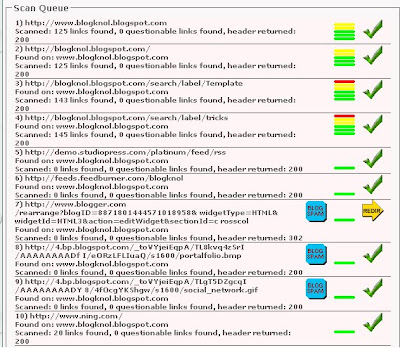
So you Should aware about your External Links, Text Link Checker Tool is one of the Best External Link Checker .You Jut needed to put your URL inside the Text-box and tool will automatically provide the scanned result .
Obviously you should use this to tool , there may be many spamming links from your blog and it will reduce your Result.Check It out!
But how about Link to Other Spamming websites or malicious websites from your Blog ? Surely it will effect your Search Results [Google,Yahoo,Bing..] .

So you Should aware about your External Links, Text Link Checker Tool is one of the Best External Link Checker .You Jut needed to put your URL inside the Text-box and tool will automatically provide the scanned result .
Obviously you should use this to tool , there may be many spamming links from your blog and it will reduce your Result.Check It out!
Blogger Templates : Novinture
Another Stunning Blogger template.It have a Good color combination , like as in Apples official website and have a professional look.This template suits to all type of blogs.
Templates contain an slide show and you can place ads along with heads where you would get good clicks.

Some Special features of the Template are listed Below.
Templates contain an slide show and you can place ads along with heads where you would get good clicks.
Some Special features of the Template are listed Below.
- Slide Show
- You can place ads along with header/logo.
- Menu bar placed the top position of the Blog.
- Easy to share the post in Facebook and twitter.
- Automatic Post thumbnails.
- Nice Header section
- Stylish comment area with avatars/profile image.
- Four Column Footer section.
- Left aligned sidebar.
- Search area at the left side
Blogger Templates : Portalfolio
Have a Blog which introduce yourself or about your products, then i would suggest you this template which looks like cool and professional.I likes its color combination.

- Top right aligned menu bar .
- Good color comination.
- 3 Column footer section.
- Slide Sow.
- Good area for introduce yourself/products.

Add Music to your Blog
What about playing music while your users open your Site , that can be put on and off by user ? I had a post a long before to add background music ,but users can't turn it Off.So i hope this post will help you very much.
To add this you should have mp3 file source code, you can be can be uploaded your code into any free hosting websites and copy the mp3 code.
To add this you should have mp3 file source code, you can be can be uploaded your code into any free hosting websites and copy the mp3 code.
- Go to Dashboard >> Design >> Add a Gadget .
- Add the Below code into it.
- You should replace the mp3 code with your new source code
- Save it and Publish.
Create social network in your blog

How about creating a social network just like Facebook,orkut where your friends and users can be talk , share , chat and more within minutes ? I am not kidding .Ning helps you to create social network where your users can sign Up and Login and add friends , just like you do in social networks.
Then How it connects with your Blog . You can connect your blog using iframe.
- Create a Page in Blogger
- Make your Post editor in "Edit Html" mode from compose Mode.
- Now add the below code into post editor.
- Replace the website with your ning URL and add into your page and Publish.
Earn Money by selling your Blog
 Is your blog having Good visitor ? How about selling your blog for Good value ? Yah Flippa helps you about to sell your blog at your value .Visit www.flippa.com to set sell your Blog and earn Money . Flippa is One of the famous Marketplace for buying and selling websites and Blogs.About 400,000 unique visitors will look over your listing, so you would get your wish money .You need to create a Account and Click on Sell Websites button in Home Page and be proceed with procedures by Flippa.
7 ways to speed up your blog

- Optimize Images : Before you Save your Image that you have plan to upload into blog,better use "Save for the web" option in the Image Editing Software ( Adobe Photoshop ) .
- Optimize Your CSS :Most blog of blogger are designed in CSS(Cascading Style Sheets) .,Avoid useless css codes to speed up your blog codes .CleanCSS is a Online tools to avoid white space in your code , it merge similar selectors and remove useless properties.
- Image Formats in Blog : Most of us are uploading images in JPEG format , in the way it make you good clarity, but i suggest save images in Gif format makes you to load images more fast than JPEG, thus it speed your Blog.
- Use Slash(/) In your Link/URL : Why should you use Slash in URL ? It helps your server to figure out its an directory page and reduce the load time of your Blog.
- Define Width and Height : After Uploading image to blogger , better set its width and height .This tags help your browser to know the width and height before loading image.So browser can reserve a space for it and load rest of page easily.
- Select Good Hosting Company : While buying a Domain, avoid low quality offers from local host and select Good namely hosting companies like Godaddy . They provide fast server and easy maintenance , this will speed up your blog.
- Remove unnecessary Meta Tags : Most Meta tags we are using in our blog is unnecessary and wouldn't give you any result.Reduce keywords in 200 characters, Click here to See the Meta tags are available.
Page views widgets for blog

- Copy the Below Code .
<b:if cond='data:blog.pageType == "item"'><div align='center' style='border:solid 2px #999999; padding:2px; margin:2px; width:100px; display:compact'><img height='16' src='http://forums.bit-tech.net/images-light/misc/stats.gif' width='16'/> <a href='http://www.allblogtools.com'><b><font size='2'><script src='http://nirav07.ulmb.com/counter.php' type='text/javascript'/> Views</font></b></a></div></b:if>Now Go to Blogger.com and Sign In.
Afterward Go to Layout >> Edit HTML.Make sure you mark on Expand Widget Template.
Now Find the Code
<div class='post-header-line-1'/>
Paste the Above Code after to It.
If you didn't find in your Code.,Find
<data:post.body/>
Paste Your Code Before to it.
Save the Template.
Google URL Shortner
 Another Web Element from Google,URL shortens.I really like its service,i sure it will be another leader segment from Google.Google URL Shortner not stick on shorten URL it extend service into many . You can be easily know how much visitors you had through the Shorten URL.And more redirection to respected websites work much faster than other URL shortens.
Actually,this Google service connected to your Google Account , so privacy and security is assure.Its name so cool , Have a check here at www.goo.gl .
I really like it.
Google Account Temporarily Disabled make Blogger dead
 Last Day i got a Comment from my reader , that has nothing but, when he tries to open his blog he have seen a message "the blog at xxxx.blogspot.com has been removed " .And it deny to see the content in the site. Actually He didn't removed that Blog. I Sure his Google account disabled temporarily and deny to access.This happen without any notification.
.Verification code will be sent via sms.
Now Go to Your Blog account[Blogger.com].If it still stick on same message go to Settings and recover it.

Subscribe to:
Posts (Atom)