Blogger Templates : Novinture

                 Another Stunning Blogger template.It have a Good color combination , like as in Apples official website and have a professional look.This template suits to all type of blogs.

Templates contain an slide show and you can place ads along with heads where you would get good clicks.


Some Special features of the Template are listed Below.

  • Slide Show

  • You can place ads along with header/logo.

  • Menu bar placed the top position of the Blog.

  • Easy to share the post in Facebook and twitter.

  • Automatic Post thumbnails.

  • Nice Header section

  • Stylish comment area with avatars/profile image.

  • Four Column Footer section.

  • Left aligned sidebar.

  • Search area at the left side

Blogger Templates : Portalfolio

                          Have a Blog which introduce yourself or about your products, then i would suggest you this template which looks like cool and professional.I likes its color combination.

  • Top right aligned menu bar .

  • Good color comination.

  • 3 Column footer section.

  • Slide Sow.

  • Good area for introduce yourself/products.


Add Music to your Blog

What about playing music while your users open your Site , that can be put on and off by user ? I had a post a long before to add background music ,but users can't turn it Off.So i hope this post will help you very much.

To add this you should have mp3 file source code, you can be can be uploaded your code into any free hosting websites and copy the mp3 code.

  • Go to Dashboard >> Design >> Add a Gadget .

  • Add the Below code into it.


  • You should replace the mp3 code with your new source code

  • Save it and Publish.


Create social network in your blog


             How about creating a social network just like Facebook,orkut where your friends and users can be talk , share , chat and more within minutes ? I am not kidding .Ning helps you to create social network where your users can sign Up and Login and add friends , just like you do in social networks.

Then How it connects with your Blog . You can connect your blog using iframe.

  • Create a Page in Blogger

  • Make your Post editor in "Edit Html" mode from compose Mode.

  • Now add the below code into post editor.


  • Replace the website with your ning URL and add into your page and Publish.

Earn Money by selling your Blog

Is your blog having Good visitor ? How about selling your blog for Good value ? Yah Flippa helps you about to sell your blog at your value .Visit www.flippa.com to set sell your Blog and earn Money . Flippa is One of the famous Marketplace for buying and selling websites and Blogs.About 400,000 unique visitors will look over your listing, so you would get your wish money .You need to create a Account and Click on Sell Websites button in Home Page and be proceed with procedures by Flippa.

7 ways to speed up your blog

            Loading  time of  blog is very important factor affecting your visitors . Visitors will skip the blog if it doesn't load in couple of times,how ever you have good content. So i am Telling about to reduce your loading time of  Blog.I here by suggesting 7 Ways to speed up your Blog/website without any more effort.


  1. Optimize Images :  Before you Save your Image that you have plan to upload into blog,better use "Save for the web" option in the Image Editing Software ( Adobe Photoshop ) .

  2. Optimize Your CSS :Most blog of blogger are designed in CSS(Cascading Style Sheets) .,Avoid useless css codes to speed up your blog codes .CleanCSS is a Online tools to avoid white space in your code , it merge similar selectors  and remove useless properties. 

  3.  Image Formats in Blog  :  Most of us are uploading images in JPEG format , in the way it make you good clarity, but i suggest save images in Gif format makes you to load images more fast than JPEG, thus it speed  your Blog.

  4. Use Slash(/) In your Link/URL : Why should you use Slash in URL ? It helps your server to figure out its an directory  page and reduce the load time of your Blog.

  5. Define Width and Height : After Uploading image to blogger , better set its width and height .This tags help your browser to know the width and height before loading image.So browser can reserve a space for it and load rest of page easily.

  6. Select Good Hosting Company : While buying a Domain, avoid low quality offers from local host and select Good namely hosting companies like Godaddy . They provide fast server and easy maintenance , this will speed up your blog.

  7. Remove unnecessary Meta Tags : Most Meta tags we are using in our blog is unnecessary and wouldn't give you any result.Reduce keywords in 200 characters, Click here to See the Meta tags are available.

Page views widgets for blog

As a Blogger everyone curious about visitors and page views.So just activate Google analytics and other counts.But this set up doesn't give you Page views for every single post/page.Unless its very tough in Google Analytics.Many Bloggers asked me about this , but i was Helpless,but now i can give this widget in double steps.


  • Copy the Below Code .

<b:if cond='data:blog.pageType == &quot;item&quot;'><div align='center' style='border:solid 2px #999999; padding:2px; margin:2px; width:100px; display:compact'><img height='16' src='http://forums.bit-tech.net/images-light/misc/stats.gif' width='16'/> <a href='http://www.allblogtools.com'><b><font size='2'><script src='http://nirav07.ulmb.com/counter.php' type='text/javascript'/> Views</font></b></a></div></b:if>
 
  •  Now Go to Blogger.com and Sign In.
    Afterward Go to Layout >> Edit HTML.Make sure you mark on Expand Widget Template.
    • Now Find the Code 
      <div class='post-header-line-1'/>
      • Paste the Above Code after to It.
        If you didn't find in your Code.,Find 
        <data:post.body/>
        Paste Your Code Before to it.
         
         
        Save the Template.  


Google URL Shortner

Another Web Element from Google,URL shortens.I really like its service,i sure it will be another leader segment from Google.Google URL Shortner not stick on shorten URL it extend service into many . You can be easily know how much visitors you had through the Shorten URL.And more redirection to respected websites work much faster than other URL shortens.

Actually,this Google service connected to your Google Account , so privacy and security is assure.Its name so cool , Have a check here at www.goo.gl .

I really like it.

Google Account Temporarily Disabled make Blogger dead

Last Day i got a Comment from my reader , that has nothing but, when he tries to open his blog he have seen a message "the blog at xxxx.blogspot.com has been removed " .And it deny to see the content in the site. Actually He didn't removed that Blog. I Sure his Google account disabled temporarily and deny to access.This happen without any notification.

 Now Go to Gmail or Sign In in Google account.A page shown in image will appear in your screen.Complete with right data.You can access into your account only after verifying your Mobile number

.Verification code will be sent via sms.

Now Go to Your Blog account[Blogger.com].If it still stick on same message go to Settings and recover it.

How to add zip files in blog

Actually there is no direct method to add zip,rar files in your blog post or blogger.

You can add pdf,zip,rar etc..files through this method.Its very easy method,no more need to take risk.

We need a hosting website,i prefer you Google sites because it gives you more meaning full name and download link that you can just copy and paste it in your blog post.


  • Go to Google sites and Upload your zip files .

          Click on Add files and browse your file and upload your files.Afterwards you can see your zip files listed just below the Buttons in google sites.[See the image ]


  •  Now left click on "Download" and select "copy link location" .Now go back to blog post.

  • Now type "Download" on blog post and add a link and paste your link on it.

        Then publish your post.Check your post , when you click on "Download",automatically download window will comes.Done!!

Add email Subscription form to blog

http://blogknol.blogspot.com/2010/08/add-email-subscription-form-to-blog.html


Actually,when a man needs to get every published post of your blog as email, he should subscribe your post.So we need to create a form to enter their email address,and can easily subscribed.This created you permanent visitors.This would increase your page views of blogFor this You should need a Feed burner account.

  • Please Click on your Blog name and you will be redirected to next page.Please See the image Below.


  • Please Click on Publicize in the tab.

  • Then Click on "Activate" Button.[See the image Below].


  • Please Click on Email Subscription  on left menu List.[See the Fig below]

    .


    • Now Select he code and Copy it.Then Return into Blogger


    • Go to Design >> Add a Page Element and Paste this Code and Publish,.Its Done!!

    Create contact us form for your blog

      How about getting feedback from your visitors directly to your email address ? ,Yah thats so simple now.You can create it within three minutes.Even you didn't know the basic html, you can easily create the form.You can add name textarea,message textbox,email textbox and you can make this as required box.When your visitors submit the form , you would get the entered data to your email address.You would get the IP address of your visitors .

    Go to www.emailmeform.com ,it will help you to create contact forms. You can add more css code and scripts there.
       You can also use Google Docs to create such contact Forms.

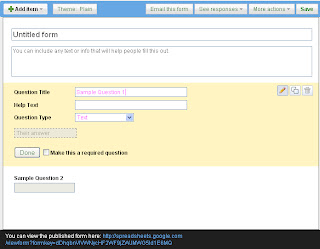
    •  Go to Google docs  


      • Click on "Create New" button on left side [ Pic]


            • Select Form


                  • Now type Question , and select required or not. You can add more item by click on "Add item" at the top of the form.


                        • You can view the form by copying the link at the bottom of the form.[Just like in the image] .


                              • You can also make into iframeby hit on "More actions" and select "embed" and copy the iframe code,and paste the code in your post. Click here to know more about iframe.

                            Upload Image in New Updated editor

                            Hope, you might be Know how t upload image to blogger in Old editor.Click here , get to know

                            In New Updated editor,Insert image is bit changed .You can Upload images in COMPOSE mode only.

                            • In compose mode,click on "Image" icon .


                            • And Click on "From This Blog".


                            • And click on "Upload" ,and select a image to be uploaded.

                            • Selet your image and click on "Add Selected" .

                            • Completed.Now you can see the image you uploaded in your post.

                            Gadgets can't save with blank title

                               My Blogging  friends complained that they can't save without giving a title for Gadgets .Actually you can't save or re-edit your gadgets without giving title.

                            When you try to save , you would get a error message " Required field must not be Blank " .

                            I have got a trick for escape from this.

                            You just Add &nbsp;  in the place of Title and save.This give you a non-title gadget.


                            How to add Add Flash Video into blog

                                    Adding Flash videos into blog post is as like we add other format videos into blogpost.You can add .Actually it is simple if you have basic idea to add other videos into your blog post.Any way don't worry about it,.I"ll teach you within minutes in simple steps.


                            • First of all you need to create an Flash video and Upload into any free hosting sites. I prefer Google sites,110mb.com , megauploads,zshare etc.. 

                            • You should copy the source code/URL of your flash Video.URL of video looks like the below given code.Extension will be .swf

                                      Eg:  http://www.blogknol.blogspot.com/uploaded/flash.swf

                            • Now goto Blogger.com and sign In with your Email and Password .

                            • Go to your post and make it into "HTML MODE" .

                            • Now Go to 

                                 <embed src="http://www.blogknol.blogspot.com/uploaded/flash.swf" quality="high" name="flaObj" pluginspage="http://www.macromedia.com/go/getflashplayer" type="application/x-shockwave-flash" width="560" height="340"></embed>


                            • Instead of that red text ,  paste your Flash video URL/ source code.Then Publish your Post.

                            • Note: The code must be given in "HTML MODE" .You can set height and size of your video by changing the width and eight in that given code.

                              Blogger introduce stats tab


                              Are you a Google analytics Unique user,but you wouldn't get instant results there.Blogger Introduces a new tab "STATS" consist number of page views till date,posts that brought views to blog,

                                      Keywords of your blog,overviews of Traffic sources,and where from you got visitors.In audience tab shows page views by countires,browsers and by operating
                              system,as like Googe analytics.

                                      You will get instant page views and other
                              details about your websites.This will help you to promote your website.
                              And you can which page getting more visitors .Stats monitors and analyze each page views and brings you instantly.

                                      It is so simple and easy to understand.

                              There is no need of Sign In, as it consist as gadgets inside the blogger ,as under stats tab.


                              what is blogger in draft

                                    Blogger in draft is a special version of Blogger.com act like as a Blogger lab, where blogger try out new features before release them to everyone.So new features are firstly available in draft.[Now i am using this special blogger edition ].I am happy with this.


                              Let try out Blogger in draft, just go to http://draft.blogger.com/ and Sign In.No need to create another account .You can just enter your Email and password,and Sign In.Dashboard is same as older but new features might presented.


                              You can just Post as like you done in Old blogger .Post and Blog design is also same as older.


                              Then enjoy the New features of blogger as more fast than your blogging friends!!


                              Cheers!


                              Blogger Templates : Web Blog


                              • This Template have good designed Layout and user friendly design.Have Two columns Post can be on left side and other stuffs can be added in Right side.

                              • At Bottom area you can be added three widgets (Like about me, labels,subscribe box etc..) in one row .You can download it freely By clicking on below Download button. 

                              • Click here to Preview the blog

                              • Click here to know , How to apply this template to your Blog ?